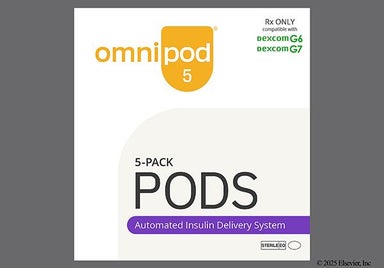
Omnipod 5
Omnipod 5 is a wearable insulin delivery system for people with Type 1 diabetes (age 2 and up). It's also for adults with Type 2 diabetes. It comes with a wearable Pod that gives insulin under the skin. You use the Controller to adjust your insulin dose. Another way to do this is through an app on compatible smartphones. You can pair Omnipod 5 with Dexcom G6, Dexcom G7, and FreeStyle Libre 2 Plus (wearable continuous glucose monitors or CGMs). This creates an automated insulin delivery system that adjusts your insulin dose based on your glucose levels. Training videos and a user guide are available to help you use Omnipod 5.


What is Omnipod 5?
What is Omnipod 5 used for?
- Controlling blood sugar levels in people 2 years and older with Type 1 diabetes
- Controlling blood sugar levels in adults with Type 2 diabetes
How Omnipod 5 works
Omnipod 5 is a wearable insulin device. It works by delivering insulin under your skin. This helps manage your blood sugar.
Drug facts
| Common Brands | Omnipod 5 |
|---|---|
| Drug Class | Insulin delivery system |
| Controlled Substance Classification | Not a controlled medication |
| Generic Status | No lower-cost generic available |
| Availability | Prescription only |
More on Omnipod 5 essentials


Get your GoodRx coupon

Pros and cons of Omnipod 5
Pros
- Lessens the need for daily insulin injections
- FDA approved for people ages 2 years and older
- Can automatically adjust insulin delivery every 5 minutes
- Can use adhesive patches over the Pod
- Waterproof in up to 25 feet of water for up to 1 hour
Cons
- Must put on a new Pod at least every 2 to 3 days
- Can cause irritation where you put the Pod on
- Can only use certain rapid-acting insulins in the Pod
- Not available over the counter
- Automated mode not recommended for people on dialysis or people who are pregnant

Pharmacist tips for Omnipod 5

- It's important to complete training on how to use Omnipod 5 properly and safely. Review the full user guide and scroll through the video library for help. Ask your care team if you have more questions.
- Change Omnipod 5 Pods at least once every 2 to 3 days. Set up a reminder on your calendar or phone to help you remember. Also change the Pod after it's delivered 200 units of insulin. Ask your care team if you need to change it more often.
How to set up your Omnipod 5:
- You can use either the Controller that comes with Omnipod 5 or the Omnipod 5 App on a compatible smartphone to control your insulin. Follow the steps in the user guide or video to set it up. You'll need some information about your settings from your prescriber.
- After completing the Omnipod 5 Controller or app setup, you're ready to set up a new Pod. First, wash your hands to prevent an infection before moving on. When you're ready, tap "Pod Info, then "Set Up New Pod," and follow the instructions.
- The next step is to fill the Omnipod 5 Pod with insulin. Follow your prescriber's directions or the steps in the user guide to do this. Only use U-100 NovoLog (insulin aspart), Humalog (insulin lispro), or Admelog (insulin lispro).
- Once you've filled the Omnipod 5 Pod with insulin, you must pair the Pod to the Controller or app within 2 hours. Then once paired, you must apply the Pod to your skin within 1 hour. If not, the Pod is unusable and you'll have to set up a new one.
How to place an Omnipod 5 Pod on your skin:
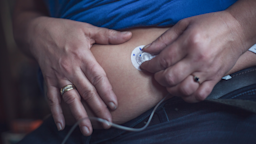
- Choose a spot on your body to put the Pod on. This can be your lower stomach (at least 2 inches away from your belly button), front or side of your thigh, buttock, or back of your upper arm. Adults can also put it on their lower back. Avoid irritated or damaged skin. Choose a different area that's at least 1 inch away for each new Pod.
- If you're using Omnipod 5 with a CGM, make sure to place them on the same side of the body where they're close to each other. This helps the Pod and the Sensor "see" and tell each other information.
- Wash the area you chose with soap and water, and dry with a clean towel. Then, wipe the area with an alcohol swab and let it air dry. This helps lower the risk of infection.
- After you take off the tab and white paper backing, stick the adhesive side of the Omnipod 5 Pod onto your skin. You can place it horizontally or diagonally on your stomach, hip, buttocks, or lower back. Place the Pod up and down or at a slight angle on your upper arm or thigh. Press down firmly to make sure the Pod sticks well.
How to start insulin delivery with Omnipod 5:
- Once applied, squeeze the skin around the Omnipod 5 Pod and tap "Start" on the Controller or app. Stop squeezing when the app or Controller asks if the cannula is properly inserted. The cannula is the thin tube that goes under the skin. Follow the steps to check if it's in correctly. Once it is, the Pod will fill the cannula with insulin.
- Next, you'll be prompted to connect the CGM. Continue if you choose to use your Omnipod 5 with a CGM and you'll be using Automated Mode. Omnipod 5 works with the Dexcom G6 or Dexcom G7 CGMs. It also works with the FreeStyle Libre 2 Plus Sensor. Keep in mind that it could take time to pair the devices.
How to remove an Omnipod 5 Pod:
- Before placing a new Omnipod 5 Pod, make sure to deactivate and remove the old Pod. To do this, go to the "Pod Info" tab on the Controller or app. Tap "Change Pod" and then "Deactivate Pod."
- Take off the deactivated Pod by gently lifting the edges of the adhesive tape. Slowly pull the Pod off of your skin to prevent skin irritation.
- Check out the Omnipod 5 take-back program where you can send your old Pods for disposal.

Risks and warnings for Omnipod 5
Omnipod 5 can cause some serious health issues. This risk may be even higher for certain groups. If this worries you, talk to your doctor or pharmacist about other options.
High or low blood sugar
Before using Omnipod 5, make sure you get proper training from your healthcare team. They'll help you program the settings into Omnipod 5.
It's important to learn to adjust your settings correctly. Otherwise, you could get the wrong amount of insulin. This can cause either high or low blood sugar, depending on how much insulin got delivered. If left untreated, these conditions can be life-threatening.
Make a plan with your care team about what to do if you have signs of high or low blood sugar or if your Omnipod 5 shows "HIGH" or "LOW" glucose readings. Always keep an emergency kit with you in case the device stops working or if you have signs of low blood sugar. Watch for signs like sweating, shaky, fast heartbeat, or feeling confused or weak.
Only use with Novolog, Humalog, and Admelog
Make sure to only use Omnipod 5 with U-100 NovoLog (insulin aspart), Humalog (insulin lispro), and Admelog (insulin lispro). We don't know how safe it is to use other insulins with Omnipod 5 because it hasn't been tested.
Only connect to trusted Wi-Fi networks
Avoid connecting your Controller or smartphone to public Wi-Fi networks (e.g., coffee shops, airports). These networks aren't secure. This could expose your Controller or phone to malware.
Risk of infection
Although rare, wearing an Omnipod 5 Pod could cause an infection. Each time you change your Pod, check for signs of infection. These can include bleeding, pain, redness, and tenderness. If you notice irritation near your Pod, talk to your care team.
Risks with changes in altitude
Sudden changes in altitude can affect the Omnipod 5 Pod's insulin delivery. This can happen on airplane rides, amusement park rides, or when mountain climbing.
To stay safe, check your glucose often when there could be a sudden change in air pressure, altitude, or gravity.
Risks when using in oxygen-rich or high-pressure environments
Don't use Omnipod 5 in oxygen-rich or high-pressure environments, like hyperbaric chambers. This could cause the Omnipod 5 Pod or Controller to explode, which could cause severe burns on your body. It can also damage the Pod and Controller. This can make less insulin that you need to get released, which could lead to high blood sugar.
Risk of too much insulin delivery if you take vitamin C and use the FreeStyle Libre 2 Plus Sensor
Don't use Omnipod 5 with the FreeStyle Libre 2 Plus Sensor if you take more than 1,000 mg of vitamin C (ascorbic acid) per day. This can change how accurate your glucose readings are from the FreeStyle Libre 2 Plus Sensor. More specifically, it can make your glucose readings falsely high. This can raise the risk that the Pod releases more insulin than you need, which can cause your blood sugar to drop dangerously low.
Before taking any supplements, check how much vitamin C they have in them. Vitamin C is often in multivitamins and cold remedies. If you're not sure, ask your pharmacist for help.

Omnipod 5 dosage

Typical dosage for Omnipod 5
Your prescriber will help you decide how much insulin you should use to fill your Pod.
Place a newly-filled Pod on the skin once every 2 to 3 days or after delivering 200 units of insulin.
You can place the Pod on your lower stomach, front or side of your thigh, back of your upper arm, or the buttock. Adults can also put the Pod on their lower back.

How much does Omnipod 5 cost?
$296.25

Omnipod 5 contraindications
Contraindications are specific health conditions or situations in which a person should not take a medication due to safety concerns. If you have any of the following conditions or if any of the following apply to you, let your healthcare provider know because Omnipod 5 will not be safe for you to take.
- Can't monitor glucose as recommended by your prescriber
- Can't keep contact with your prescriber
- Can't use Omnipod 5 according to instructions
- Have hearing or vision problems that make it hard to use Omnipod 5 properly
- Take hydroxyurea (Hydrea) and use a Dexcom sensor
- Take more than 1,000 mg of vitamin C (ascorbic acid) per day and use a FreeStyle Libre 2 Plus Sensor
- Use automated mode if you're currently pregnant, on dialysis, seriously ill, under the age of 2 years old, or you need less than 5 units of insulin per day

What are alternatives to Omnipod 5?

Omnipod 5 images